- This topic is empty.
-
AuthorPosts
-
24/07/2026 at 15:04 #11694
Selecting the correct DC connector size and polarity is one of the most overlooked yet critical steps when deploying a Mini DC UPS for routers, ONTs, modems, gateways, CPE devices, or other subscriber-side network equipment. A mismatched connector or reversed polarity can cause a device to fail to power on, trigger protection circuits, or in worst cases damage sensitive electronics. For telecom operators, Internet Service Providers, broadband network companies, system integrators, and OEM/ODM project customers, getting this step right is essential before any backup power unit is confirmed for pilot testing or mass deployment.
Why Connector and Polarity Matching Matters
Every networking device—whether a router, ONT, modem, gateway, or small communication terminal—is designed to accept power through a specific connector geometry and a specific polarity arrangement. If the backup power output does not physically fit the device’s power jack, or if the polarity does not match what the device expects, the equipment simply will not operate correctly, even if the voltage and current ratings are technically appropriate. This is why connector and polarity confirmation should never be treated as a minor detail in a Mini UPS or telecom BBU project; it is part of the core application matching process that determines whether a backup power solution will actually work in the field.
Step 1: Identify the Original Power Adapter Specifications
Before selecting a Mini UPS, the original power adapter that ships with the device should be examined closely. This adapter typically indicates the output voltage, the connector barrel size, and the polarity symbol—usually shown as a small diagram with a center dot and surrounding ring, marked with plus and minus signs. This information provides the baseline reference for choosing a compatible backup power unit. Relying only on the voltage rating printed on the adapter, without checking the connector and polarity details, is a common cause of wrong model selection in backup power projects.
Step 2: Confirm the Physical Connector Size
DC barrel connectors come in different outer and inner diameters, and even a small mismatch can prevent a secure and reliable connection. A connector that is too loose may cause intermittent contact and unexpected reboots, while a connector that is too tight may not seat fully, leading to unstable power delivery. This is particularly important for subscriber-side broadband equipment, where a poor connection can be mistaken for a hardware fault and generate unnecessary field service calls. For project-based deployments, connector size should be verified against the actual device port rather than assumed from general product categories.
Step 3: Verify Polarity Before Connection
Polarity refers to whether the center pin of the connector carries the positive or negative terminal. Most consumer and telecom equipment uses a center-positive configuration, but this is not universal, and some devices are built with center-negative polarity. Connecting a backup power unit with reversed polarity can, depending on the device’s internal protection design, either prevent normal startup or cause damage to internal circuitry. Careful polarity verification—ideally supported by testing before full deployment—helps avoid this risk entirely.
Step 4: Account for Real Working Current and Startup Surge
Connector and polarity matching should be evaluated together with the device’s real working current and startup surge behavior, not just its labeled voltage. A backup power unit that has the correct connector and polarity but insufficient current capacity may still cause the device to restart or shut down under load. This is especially relevant for higher-power gateways, WiFi routers, and broadband CPE, where actual operating current can exceed what a standard low-current Mini UPS model is designed to support.
How MYLION Approaches Application Matching
Shanghai Mylion New Energy Co., Ltd., operating under the MYLION brand at http://www.myliontech.com, positions itself as a specialized Mini DC UPS and telecom BBU solution provider for broadband, fiber, ISP, telecom, and network infrastructure applications. Rather than offering generic UPS products, MYLION supports project-based model selection based on actual device power consumption, startup surge current, backup time target, installation environment, certification needs, labeling requirements, and mass production feasibility. This approach directly addresses the connector and polarity matching challenge, since MYLION helps customers select suitable models based on real working current, startup surge, device voltage, connector type, runtime target, installation method, and safety margin.
With over 13 years of experience in lithium battery packs, Mini UPS, DC backup power, and customized battery solution development, MYLION has built a product range that spans 5V, 9V, 12V, 15V, 24V, 48V, USB-C, PoE, and multi-output backup power applications. Within this range, models such as the 12V Standard Mini DC UPS Series (MU68, MU26, MU48) are built for mainstream networking devices, while the High-Power 12V Telecom BBU Series (MU35, MU65) is designed for advanced gateways and higher-current CPE that standard low-current models cannot adequately support. For space-constrained FTTH installations, the Inline FTTH Mini UPS Series (MUJ46) connects directly between the original adapter and the device, simplifying connector matching for ONT, router, modem, and gateway backup. For devices transitioning to newer power architectures, the USB-C PD Mini UPS Series (MUC85) addresses backup needs for equipment using USB-C input instead of traditional DC barrel connectors, while the 24V/48V DC Backup Power Series (MU248) supports selected telecom and communication devices that require higher DC voltage input than standard 12V models.
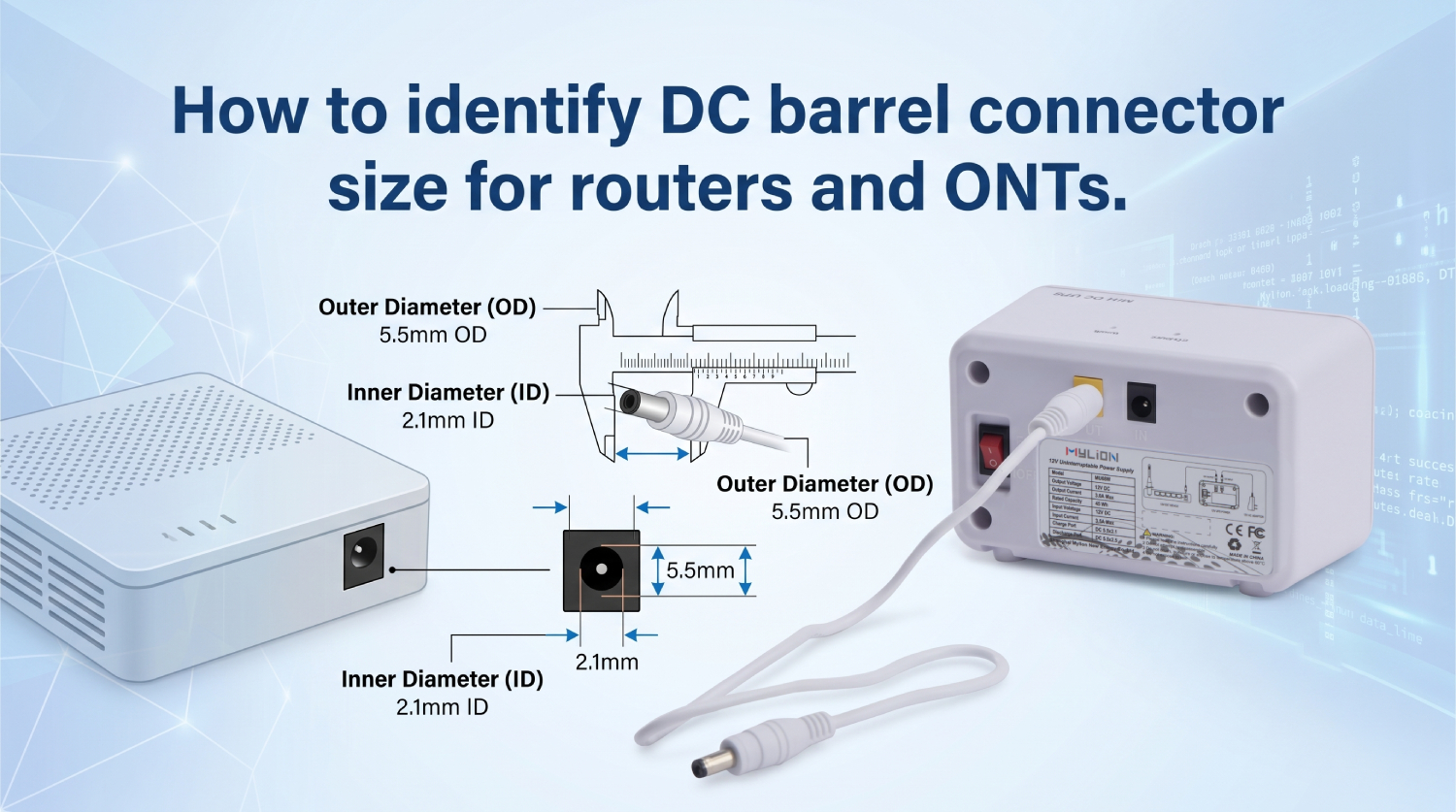
Supporting Safer Model Selection
MYLION supports connector and cable matching according to customer device requirements, and for project-based applications can accommodate customized housing, labeling, connectors, cables, battery capacity, charging parameters, and output configuration when technically feasible. All models are built on lithium-ion or LiFePO4 battery pack solutions with BMS protection against overcharge, over-discharge, overcurrent, short circuit, and abnormal operating conditions, which adds a layer of safety even when device-side matching is being confirmed during sample testing.
Conclusion
Correctly identifying DC connector size and polarity is a foundational step in any Mini UPS or telecom BBU deployment, and it should always be evaluated together with real device voltage, working current, and startup surge behavior. For telecom operators, ISPs, broadband providers, system integrators, and OEM/ODM customers seeking a structured approach to this process, MYLION’s project-based model selection—supported by connector and cable matching, customization capability, and quality inspection before shipment—offers a practical path toward reliable, project-ready backup power deployment across routers, ONTs, modems, gateways, and other subscriber-side network equipment.
http://www.myliontech.com
Shanghai Mylion New Energy Co.,Ltd. -
AuthorPosts

- You must be logged in to reply to this topic.